Showing posts with label dll. Show all posts

Friday, February 17, 2012

Implementing a VB6 COM interface in VB.Net - it's not all roses!

Not long after my revelation last week, that VB.Net could implement my VB6 COM interface that had a "optional string" parameter, I ran into a brick wall: VB.Net cannot implement a COM interface where a "Public Property" that passes variables by-reference has been exposed. ie. it can't implement this VB6 code:


Public Property Let MyProperty(sValue As String)
...
End Property


Try it and you get the following error:

Implementing property must have matching 'ReadOnly' or 'WriteOnly' specifiers.

This is a known bug and the only solution is to modify your COM interface (in your original VB6 dll) so that the arguments are passed by-value:


Public Property Let MyProperty(ByVal sValue As String)
...
End Property


Which, under the covers, changes the COM interface from:


[id(0x68030000), propput]
HRESULT MyProperty([in, out] BSTR* );


to


[id(0x68030000), propput]
HRESULT MyProperty([in] BSTR );


But of course, I don't want to change the COM interface - I want to implement the interface that has already been defined and is already being used by multiple legacy applications.

Or I can use C#, which handles these Public Properties just fine.

So I'm caught in a bind - only C# can handle the Public Properties, and only VB.Net can handle the Optional String Parameters. I'm going to have to break my COM interface and force multiple client recompilations... OR use a VB6 COM facade that calls my .Net dll.

A tough choice - yuck, yucky, or yuckier?

Monday, February 13, 2012

HOWTO: Replace a VB6 dll with a C# dll when methods have optional string parameters

My quest to replace my VB6 COM dll with a C# dll continues. In my last post I resolved the problems I was having where early binding to the DLL didn't work, but late binding did.

The problem I need to address this time is handling a VB6 method that has an optional String parameter. Something like:


Public Sub TestMethod(ByVal sArgIn As String, Optional sArgOut As String)


Looking in the TypeLibrary for the DLL (the *.IDL file we get from the OLEVIEW tool), we see this:


HRESULT TestMethod(
[in] BSTR sArgIn,
[in, out, optional] BSTR* sArgOut);


Creating the TLB via the MIDL command works, but it gives the following warning:

.\MyDll13.IDL(30) : warning MIDL2400 : for oleautomation, optional parameters should be VARIANT or VARIANT * : [optional
] [ Parameter 'sArgOut' of Procedure 'TestMethod' ( Interface '_TestClass' ) ]


I'll now go ahead and create my .Net DLL. When I use .Net to implement the interface, it stubs the C# method as:


using System.Runtime.InteropServices;

namespace MyDllNet
{
[ProgId("MyDll.TestClass")]
[ComVisible(true)]
[Guid("D860A2A8-5003-4714-AE59-918FE2B0FC42")]
public class MyProxyClass : MyDll13ModifiedTA.TestClass
{
public string GetVersion()
{...}

public void TestMethod(string sArgIn, [OptionalAttribute]ref string sArgOut)
{...}
}
}


This looks good. After completing the code and compiling it, I run my original VB6 app which uses the TestMethod method from a VB6 app via late binding. It works fine when I pass two parameters, but if I only pass one parameter it falls over with "Run-time error '13' Type mismatch". Interestingly, the VB6 app which uses early binding works with both one or two parameters passed!


C# DLL implements IDL with optional BSTR* argument
VB6 BindingPass One ArgPass Two Args
Early BindingOKOK
Late BindingOKError "Type mismatch"


Plan B. Plan B is to change the optional parameter in the IDL from BSTR* to VARIANT*. According to the MIDL error message, VARIANT* is the right type to use for an optional parameter in COM. Note that I'm not changing the original VB6 COM component, I'm just changing the definition in the Type Library.

Creating the TLB via the MIDL command no longer raises a warning; implementing this new IDL/TLB in Visual Studio yields the following method signature:


public void TestMethod(string sArgIn, [OptionalAttribute]ref object sArgOut) {}


But does it work? No, it's worse! Now it crashes the CLR!!


C# DLL implements IDL with optional VARIANT* argument
VB6 BindingPass One ArgPass Two Args
Early BindingError clr.dll APPCRASHError clr.dll APPCRASH
Late BindingOKOK


OK, this confirms that I don't know what I'm doing! But wait, if I remove all of the code from my "TestMethod" in the .Net DLL then everything works!?! The APPCRASH must be caused by the way I'm handling the object argument in my .Net code. Time to debug into the .Net dll component and see what's going on!

And it turns out that if I try to return anything at all (apart from null) in the optional parameter, I get a System.StackOverflowException in an Unknown Module. Almost time for me to give this one away. Just one last thing to try... VB.Net!

Plan C. VB.Net VB.Net offers more comprehensive COM support, presumably because it is supposed to be a migration path for people who have VB6. So I'll create a new VB.Net class project, and add a reference to the "optional BSTR*" assembly (create in Plan A above), and implement the interface in VB.Net. The VB.Net code looks something like:


Imports System.Runtime.InteropServices

<ProgId("MyDll.TestClass")>
<Guid("D860A2A8-5003-4714-AE59-918FE2B0FC42")>
Public Class MyProxyClass
Implements MyDll13TldAssembly.TestClass

Public Function GetVersion() As String Implements MyDll13TldAssembly._TestClass.GetVersion
...
End Function

Public Sub TestMethod(ByVal sArgIn As String, Optional ByRef sArgOut As String = Nothing) Implements MyDll13TldAssembly._TestClass.TestMethod
...
End Sub
End Class


And guess what? It works! Late-binding, early-binding, the optional supplied, the optional not supplied. All combinations work!. Job done.

To Conclude: If you want to implement a VB6 COM interface, which has an optional String parameter, in .Net, then use VB.Net! (with some provisos)

Tuesday, February 7, 2012

The quest to replace a VB6 dll with a C# dll continues

I have a VB6 dll that is being used, via COM, in multiple VB6 apps, COM add-ins, and Outlook Forms. It is being used via both late binding [Set o = CreateObject("a.b")] and early binding [Set o = New a.b] techniques. The idea is to replace the VB6 dll with a C# dll that does exactly the same thing, without touching any of the other applications.

I started by creating a C# dll that implements the same COM interface. But this only got me halfway there. I had two problems:


  1. It worked for late binding, but did not work for early binding. With early binding, the program would use the old VB6 dll (if present) or display the "ActiveX component can't create object" message.


  2. It did not work for a method that had an optional String parameter eg. Public Sub TestMethod(ByVal sArgIn As String, Optional sArgOut As String)


Note that in the years that have passed since this project was started (and stopped, and restarted), I've switched from VS2008 to VS2010, and from .Net 1.1 to .Net 4.0. Some of these problems might have arisen from this change in tools.

Identifying the late binding/early binding problem

Further investigation into COM revealed that when a VB6 dll is registered, it writes the following important entries into the registry (for a VB6 DLL called "MyDll.dll" with an exposed class called "TestClass" which therefore has a ProgId of "MyDll.TestClass"):


HKEY_CLASSES_ROOT\MyDll.TestClass\CLSID
+-- (Default) {ABB83F02-4012-45E4-ADD6-D2E79F45381D}


The "{ABB83...}" string is called a GUID which is basically a unique identifier. Following this in the registry, we get (amongst other things):


HKEY_CLASSES_ROOT\CLSID\{ABB83F02-4012-45E4-ADD6-D2E79F45381D}
+-- InProcServer32
+-- (Default) C:\code\MyDll.dll
+-- TypeLib
+-- (Default) {EACF9A0F-461E-4A36-A195-43ECDE3C5FBA}
+-- VERSION
+-- (Default) 1.1


Following the TypeLib entry (and using the "VERSION" value of "1.1") we get:


HKEY_CLASSES_ROOT\TypeLib\{EACF9A0F-461E-4A36-A195-43ECDE3C5FBA}
+-- 1.1
+-- 0
+-- win32
+-- (Default) C:\code\MyDll


All very boring, BUT the path to my VB6 dll is held in two different places. From what I can tell, late binding uses the first path shown at ...\CLSID\...\InProcServer32, and early binding uses the second path shown at ...\TypeLib\...\win32.

By adding the ProgId attribute to my public .Net class (like [ProgId("MyDll.TestClass")]) and registering it via regasm, my C# dll gets placed into the ...\CLSID\...\InProcServer32 entry. Well actually, because we only added the ProgId to our .Net dll, a new GUID is generated. But because late bound calls are resolved using the "MyDll.TestClass" ProgId, any late bound call to MyDll.TestClass will now use the .Net dll instead of the old VB6 dll.

But the ...\TypeLib\...\win32 registry entry still points to the old VB6 dll (or doesn't exist at all if the VB6 dll has been unregistered via "regsvr32 /u"). So early bound clients will still use the old VB6 dll, or crash.

Resolving the late binding/early binding problem

Resolving this is actually pretty straight-forward. We modify the "AssemblyInfo.cs" file in our .Net project, and insert the TypeLib GUID in there (or replace it with our TypeLib GUID if an entry is already there):


[assembly: Guid("EACF9A0F-461E-4A36-A195-43ECDE3C5FBA")]


Note that this is the TypeLib GUID not the CLSID GUID. I only knew the TypeLib GUID by inspecting the registry. I could also have found this TypeLib GUID by looking into one of the *.VBP project files for a VB6 project that early binds to this dll, where I would have seen:


Reference=*\G{EACF9A0F-461E-4A36-A195-43ECDE3C5FBA}#1.1#0#MyDll.dll#


Just to be neat and tidy, we can force .Net to use the same CLSID GUID as the VB6 dll by adding the "GUID" attribute to the .Net public class:


[ProgId("MyDll.TestClass")]
[ComVisible(true)]
[Guid("ABB83F02-4012-45E4-ADD6-D2E79F45381D")]
public class MyProxyClass : MyDllTlbAssembly.TestClass
{ ...


Next up? Solving the optional String parameter problem!

Monday, March 21, 2011

Using log4net with shared DLLs


I've got a C# DLL that is used from a number of different places, including .Net EXEs, VB6 EXEs, Work and Outlook COMAddIns and also Outlook forms. It uses log4net for tracing and debugging.

I'd found log4net to be pretty reliable BUT sometimes messages weren't ending up in my log file (usually when I really needed them!). Most recently this happened today when I was trying to trace a problem in my Outlook form. I'd drag the appointment in Outlook which would fire the Item Write event on the form and, although I could loo kin the DB and see that my DLL was working, nothing was showing up in the log4net log file.


How to Investigate the Problem


To find out what was really happening, I used log4net's internal debugging. In the case of an Outlook Form, I switched it on like this:


  1. Started Outlook

  2. Started Visual Studio and opened my DLL project

  3. Switched on log4net internal debugging by modifying my log4net configuration file and changed the <log4net> to read <log4net debug="true">

  4. Used "Tools-Attach to Process" and attached to the Outlook.exe process

  5. Placed a breakpoint in the project on a line that I knew it should encounter

  6. Ran the test again...


The Problem


When I ran the test again with log4net debugging switched on, I could clearly see that log4net was unable to write to my logfile because it was locked. I didn't obviously have it locked (I had it open in TextPad but closing that didn't fix the problem). A quick scout around revealed that log4net with the RollingFileAppender by default will lock the file and keep it locked. Clearly this was the problem in my case where multiple programs all use my DLL which writes to the same logfile.


The Solution


I do want all of the instances of my DLL to write to the same log file, but I don't want them to lock the file and keep each other out. The solution was to add the following to the appender section of my log4net configuration file:


<lockingModel type="log4net.Appender.FileAppender+MinimalLock" />


This instructs log4net to get the lock, write and release the lock every time - so it doesn't keep the file locked. With this in place, all of my DLL instances now write to the logfile, ALL of the time! There is a slight performance overhead to this approach, but then I'd rather than it works slowly, than not working quickly!

Tuesday, May 13, 2008

Creating a COM Proxy in .Net

I've got a VB6 COM component that is being used by lots of other applications: VB6 apps, Word Add-ins, Outlook add-ins, Outlook forms, VBScript libraries etc. I want to upgrade this to .Net so that (a) we are reducing our dependence on VB6, and (b) we can start using some of the cool new .net capabilities and (c) new .Net components can talk to this component via standard .Net methods rather than using COM.

The idea is to break this component into two separate .Net components. The first will be a proxy component which implements all of the original methods and properties from the VB6 component, and implements the same COM interface, so it can be swapped in for the old component. It won't do any work, but instead will invoke methods on the second component to do the work. The second .Net component will be a .Net assembly written in the proper .Net fashion that does all of the work that the old VB6 DLL used to do. New .Net applications can make calls directly into the second component and by-pass the COM interface.

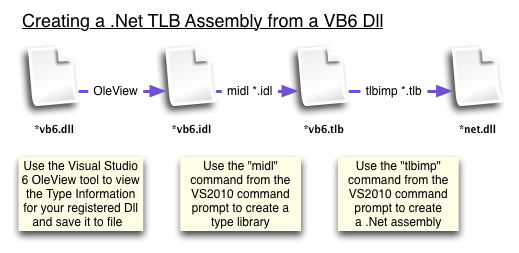
So how do we create this COM facade? The way I ended up doing it was to extract the type library from the VB6 component, generate a .Net assembly that defines the interfaces in CLR metadata, and then created a .Net assembly to override the interfaces.

vb6-to-net-typelibrary-dll.jpg

The steps for this are:

1. On a machine which has your VB6 COM component registered and Visual Studio 6.0, fire up the OLEView tool.

2. Find your VB6 component. I looked under "Automation Objects" for the ProgId which is the "MyComp.ClassA" you use when you do a CreateObject("MyComp.ClassA") in VB6.

3. Select "Object-View Type Information" to display the "ITypeLib Viewer". Your IDL is in the right-hand pane.

4. Save the IDL by clicking the save button. You now have a "MyComp.IDL" file.

5. Fire up the VS2008 command prompt and navigate to your IDL file.

6. Type "MIDL MyComp.IDL" to generate a type library. I needed to reorder some of the things in the IDL to get it working. You will now have a "MyComp.TLB" file.

7. Create your .Net assembly by typing "tlbimp MyComp.Tlb /out:MyCompTlbAssembly.dll". This will generate a "MyCompTlbAssembly.dll" file. This is a .Net assembly that defines your interface. Now we need to override it and implement our new code.

8. Create a new .Net Class project. I called mine "MyCompProxyNET".

9. Add a reference to your recently create "MyCompTlbAssembly.dll" by using "Project-Add Reference" and then going to the "Browse" tab and finding your dll.

10. Create a class for the first class from your VB6 component that you want to override, eg ClassA. I called my class "ClassAProxy".

11. Add an import of the System.Runtime.InteropServices, set your prog id to match the original VB6 prog id, and implement your interface. So you have something like this:


using System;
using System.Runtime.InteropServices;

namespace MyCompProxyNET
{
[ProgId("MyComp.ClassA")]
public class ClassAProxy : MyCompTlbAssembly.ClassA
{
}
}


12. Now implement the interface for this class. VS2008 will generate stubs for you if you right click the interface ("MyCompTlbAssembly.ClassA" in this case) and choose "Implment Interface". Nice!!

13. Almost there, now we just have to make this COM visible. Under "project-Properties-Application-Assembly Information", check the "Make assembly COM-Visible" box, and "OK". Under "Project-Properties-Build" check the "Register for COM Interop" box.

14. Build your solution. Your .Net assembly is now the registered component for that ProgId. You can verify this by looking up the ProgId in the registry under HKEY_CLASSES_ROOT and following the Clsid to the HKEY_CLASSES_ROOT/CLSID/{your clsid}. You can see that the name of the .Net component will be displayed in the "InProcServer32" key. Previously your VB6 dll would have shown up in here.

Run one of your apps that used the old VB6 component and you should get a nice "The method or operation is not implemented" error message. This error is thrown by the .Net stubs you created in step 12. Just put some real code in your stubs and away you go!